Engineering
Where the GPU time goes when you serve a video model
A video model in production pays for more than drawing frames: waiting, moving weights, sharing GPUs and redoing work. Where each goes, and the levers.
Our post on denoising steps explained what one clip costs: the size of each pass through the network, times the passes in each step, times the steps. That is the cost of drawing.
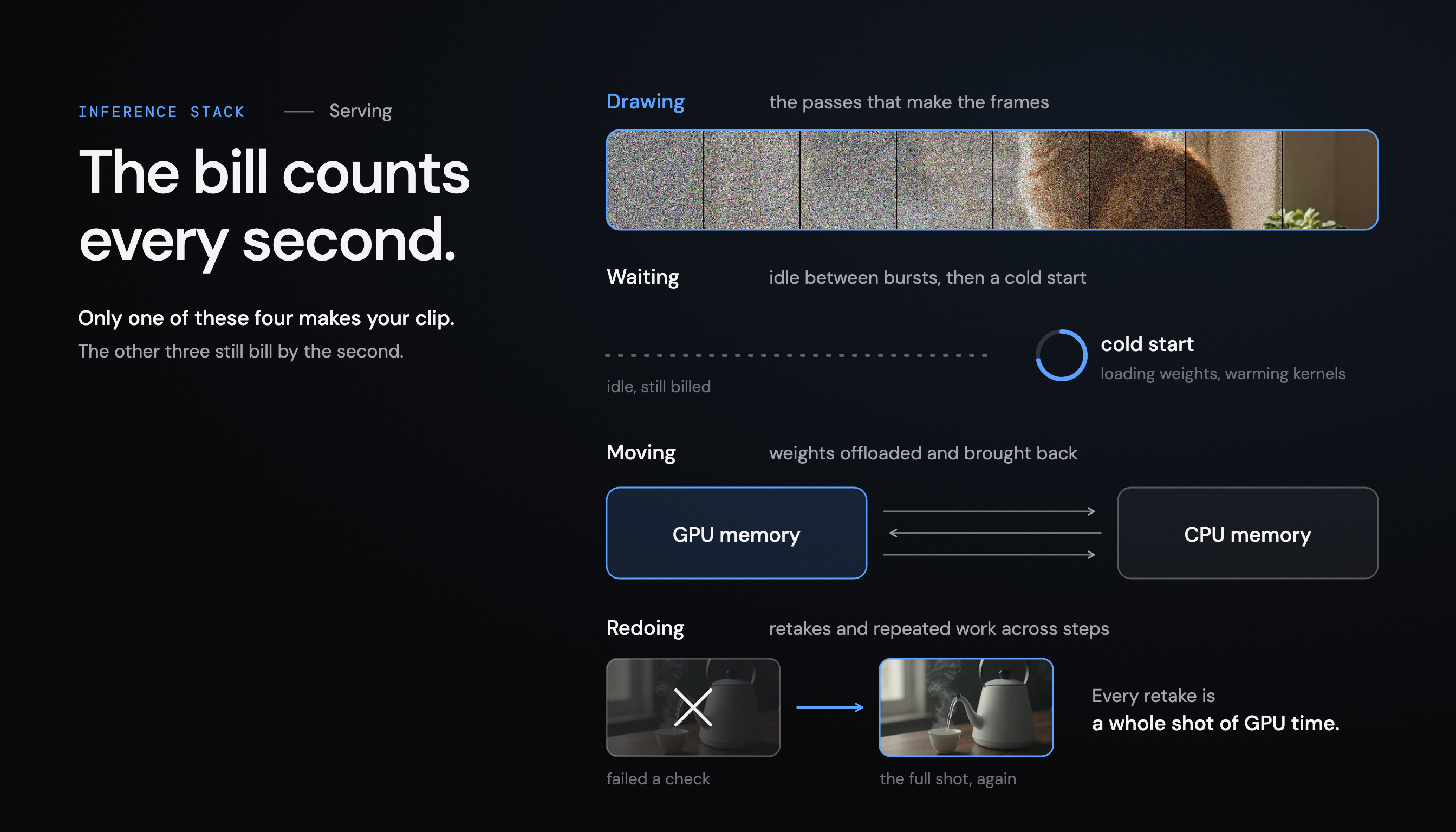
A model in production pays for more than drawing. The bill counts every second the GPU is reserved, and many of those seconds are spent on something else: waiting for work, moving weights in and out of memory, sharing badly, or making a clip that is thrown away. This note goes through the four, and the levers for each. Every lever trades something, so every one needs measuring.
Waiting: the GPU with nothing to do
A GPU that is switched on and idle costs the same as one that is busy. Traffic for a video product comes in bursts: a launch, a time zone waking up, a batch job. Between the bursts, a server sized for the peak waits.
The obvious answer is to switch GPUs off when nobody needs them. The price is the cold start. Before a new worker can draw anything, it has to load the weights, which for a large video model fill a good part of the GPU’s memory, and often warm up compiled kernels that are built on the first call. A request that lands on a cold worker waits for all of that.
So the lever is a balance, not a switch: how many workers stay warm, how fast new ones start, and how long a customer can wait. Each workload has a different answer, and the answer moves as the traffic does.
Moving: when the model does not fit
A video pipeline is more than the denoising network. It also has a text encoder that reads the prompt and a decoder that turns the result into frames. Together they may not fit in one GPU’s memory, especially at long lengths and high resolutions.
The common fixes move work in and out of memory. Hugging Face’s guide to reducing memory in diffusers describes the options plainly:
- CPU offloading moves parts of the model to the CPU and back when they are needed. It reduces memory dramatically, and the guide calls it extremely slow.
- Model offloading moves whole components instead, keeping the one that runs many times, the denoising network, on the GPU while it works. It costs less time.
- Decoder tiling decodes the frames in overlapping tiles to lower the peak, with a warning that tiles can differ slightly in tone.
Each fix turns a memory problem into a time problem, or a quality risk. The cheapest choice depends on the GPU, the model and the clip size, which is why it should be measured on the hardware that will run it rather than chosen once.
Sharing: one GPU, one clip
Language model servers get much of their efficiency from batching: many requests share each pass through the network, and systems such as Orca schedule them token by token so the batch stays full. Video is harder. One long, sharp clip can fill a GPU’s memory by itself, and requests differ in length, resolution and format, so they do not batch neatly.
There are two ways to change the unit of work. You can split a large GPU into smaller isolated pieces, as NVIDIA’s Multi-Instance GPU does on some data center GPUs, so small jobs stop wasting a whole card. Or you can split one clip across several GPUs: xDiT combines methods such as sequence parallelism and PipeFusion to run one diffusion transformer request on many GPUs at once, which cuts the wait for a long clip.
Neither is free. Small slices limit the clip size. Splitting a clip adds communication between GPUs, so the speed-up depends on the model, the clip and how the GPUs are connected.
Redoing: work that is thrown away
Some GPU time makes a clip that nobody sees. A production pipeline that checks its output, as a careful one should, makes a shot again when it fails: wrong words, stray text, a frame that breaks a rule. Every retake costs a full shot of GPU time. Fewer failures at the source is a cost lever, not only a quality one.
There is also repeated work inside a single clip. Neighbouring denoising steps often compute similar things. Training-free caching methods reuse part of that work instead of computing it again: DeepCache reuses high-level features between steps, and TeaCache estimates, for video models, which steps can reuse earlier outputs.
Reusing work changes the numbers inside the model, so it can change the picture. A cache setting that is invisible on one prompt can soften motion on another. It has to be compared with the original model’s output, like every other speed change. Our post on verifying every speed-up explains how we do that.
Measure all four together
The four interact. Keeping more workers warm cuts waiting and raises idle cost. Offloading fits a bigger model and slows each clip. Splitting a clip across GPUs shortens the wait and adds communication. Caching saves passes and can raise the retake rate if it hurts quality.
That is why we treat serving as a loop rather than a setting. Deep Variance builds the auto-tuning inference stack for production diffusion workloads: it profiles each model on the GPU that runs it, tunes it to that GPU, verifies each change against the original model’s output, and tunes again when the model, the GPU or the traffic changes.
If you run video models in production, a few questions show where your GPU time goes:
- How busy are your GPUs across a day, and how long does a cold start take?
- Does the whole pipeline fit in memory at your longest clip, or does it offload?
- How do requests share GPUs, and what does splitting a clip buy you?
- How many takes are thrown away, and has any caching you use been checked against the original output?
If you want to compare notes on yours, write to us.
Run our stack on your own GPUs.
We tune it to your diffusion models and verify every change against the original output.